Early on we decided to separate our attachment service onto it's own dedicated server in order to offload that work from the BES servers. So now all 3 production BES servers point to this one attachment server.
One thing I noticed early on is that the BES servers cannot re-attach to the attachment server automatically. That is, if you restart the attachment server/service, attachment decoding will fail for all BlackBerry users until the associated BES task is restarted on all the associated BES servers.
The connection to the remote attachment server is handled within the BES Domino task, and the first time it connects upon startup, the BES task creates a special ID associated with that server's connection. When the attachment server is restarted, that connection ID no longer exists and the attachment server will reject decode requests from the BES server.
It is a simple fix (restarting BES task), but disruptive and can cause headaches during our monthly maintenance window - I have to always remember to restart the attachment server first before any of the BES servers are restarted.
This issue occurred in the 4.0 environment however it would be interesting to see if it still occurs in the 4.1 environment. When I find out I will post an update, however I haven't seen any SDR's addressing this issue as of yet.
One more thing to watch out for in a complex distributed BES environment!
UPDATE 7/24/07: It appears that this issue was addressed in 4.1 SP4, so no more reboot juggling required!
Monday, July 23, 2007

Wednesday, June 20, 2007
Thinking of removing your DST software config? Read this...
Thinking that this was no longer a large issue, I nonchalantly removed the DST software config from ~1300 users last week. About a few hours later I get some inquiries from the regional offices to the effect of:
"We had some people call about receiving a 'Permission's restrictions need to be updated, do you want to restart your device now or later' prompt on their handheld. They accepted it and the device restarted, but I had never seen this before, what is it?"
This is the "Oh s***" moment, when you realize that something seemingly innocuous had directly impacted each and every user you modified in bulk.
You could say this was pretty minor, their functionality was fine and all they needed to do was restart the device, but that type of stuff doesn't fly in our environment. Everything that directly impacts the user requires a change control approval process.
Time to move the function "unapply software configuration" from daily administrative task to change-controlled lockdown!
Apparently this happens when you initially followed RIM's recommendation and created a specific software policy for DST which allowed external communications. Removing this software policy reverts it back to some default policy which requires a restart, hence the user prompt.
Oh well, live and learn. (...and share the pain!)
"We had some people call about receiving a 'Permission's restrictions need to be updated, do you want to restart your device now or later' prompt on their handheld. They accepted it and the device restarted, but I had never seen this before, what is it?"
This is the "Oh s***" moment, when you realize that something seemingly innocuous had directly impacted each and every user you modified in bulk.
You could say this was pretty minor, their functionality was fine and all they needed to do was restart the device, but that type of stuff doesn't fly in our environment. Everything that directly impacts the user requires a change control approval process.
Time to move the function "unapply software configuration" from daily administrative task to change-controlled lockdown!
Apparently this happens when you initially followed RIM's recommendation and created a specific software policy for DST which allowed external communications. Removing this software policy reverts it back to some default policy which requires a restart, hence the user prompt.
Oh well, live and learn. (...and share the pain!)
Tuesday, June 19, 2007
Lotus Domino TimeDate Structure
This structure is used in many places within Domino, such as creation / modification times as well as database and replica ID's. Here is a diagram showing just what nuggets of interesting information are stored in this critical Notes data structure:


Tuesday, June 5, 2007
Analysis: "Transaction Error: Failure at Service"
Had this error pop up on a handheld today when trying to send from the device, got the dreaded red X. Receiving messages, however, was fine. Usually this boils down to one of a couple of issues:
1) BES server issue
2) Carrier issue
3) Service Book issue
Since the BES was fine and the carrier seemed to be OK for other users, it must have been a Service Book issue. Tried deleting and then undeleting the Desktop [CMIME] service book, didn't work. Tried deleting the Desktop [CMIME] service book, then pushing service books from the BES. Didn't work. Since lookups were also having a problem, I theorized that the odds of 2 service books (lookups are the Desktop [ALP] service book) getting corrupted was pretty small, so time to move onto the next possible culprit.
To take the carrier out of the picture, I hooked the device up to USB so that the messages would be sent using the BlackBerry Router over USB / LAN, totally bypassing the wireless carrier and thus getting that variable out of the picture.
Well I still got the Red X. Hmmm.... but this time it did not specify "Failure at Service". This time the sub-error was "Decryption Failure". Interesting: so now we are getting down to the root of the problem and I can definitely say it is not the carrier or the service books.
So I check the Dispatcher logs, since it is responsible for encryption/decryption to the device, and voila:
[30368] (06/05 10:41:18):{0xFC0} {User} Packet has been delivered to device, Tag=4758107
[40700] (06/05 10:41:44):{0xD8} {User} Receiving packet from device, size=127, TransactionId=1429352292, Tag=259213, content type=ITADMIN, cmd=0x3
[20209] (06/05 10:41:44):{0xD8} {User} DecryptDecompress() failed, Tag=259213, Error=604
[40275] (06/05 10:41:44):{0xD8} {User} Sending transaction error to device for transaction 1429352292, size=46, TransactionId=-966799068, Tag=4758202
So now I know it is an encryption issue, so let's generate a new key:
[40700] (06/05 11:05:13.616):{0x1468} {User} Receiving packet from device, size=225, TransactionId=1429352316, Tag=7143787, content type=OTAKEYGEN, cmd
=0x3
[30222] (06/05 11:05:13.616):{0x1468} {User} MFH: contentType=OTAKEYGEN, sizeOTA=180, sizeOTW=180, TransactionId=1429352316, Tag=7143787
[30308] (06/05 11:05:13.616):{0x1468} [BIPPa] {User} Forwarding data to BES Agent (S45776843), size=218, intTag=1911024, Tag=7143787
[30311] (06/05 11:05:13.616):{0x1438} {User} Forwarding status to relay, intTag=1911024, Tag=7143787, Status=1
[40279] (06/05 11:05:13.616):{0x1438} {User} SubmitToRelaySendQ, Tag=7143787
[30222] (06/05 11:05:13.616):{0x1288} {User} MTH: contentType=OTAKEYGEN, sizeOTA=14, sizeOTW=14, TransactionId=-2070675455, Tag=6675317
[30310] (06/05 11:05:13.616):{0x1288} {User} Forwarding internal data to device, contentType=OTAKEYGEN, routing=S45776843, device=23F7A64F, size=55, cm
d=0x3, ack=0, TransactionId=-2070675455, intTag=7486040, Tag=6675317, Submit=1
[40279] (06/05 11:05:13.616):{0x1288} {User} SubmitToRelaySendQ, Tag=6675317
Well it looks like it didn't do much, let's go back to the MAGT log and see what it did during this same time period:
[40076] (06/05 11:05:13.616):{0x920} {User} SendStatusToWirelessNetworkUsingSRP SendQ, TID=1911024
[40400] (06/05 11:05:13.616):{0x920} {User} Received datagram with content type OTAKEYGEN, TID=1911024, for user User
[40386] (06/05 11:05:13.616):{0x920} {User} {User} Sending message to device, Size=49, TID=7486040, TransactionId=-2070675455
[40081] (06/05 11:05:13.616):{0x920} {User} SendToWirelessNetworkUsingSRP - SendQ, TID=7486040
[30591] (06/05 11:05:13.616):{0x920} {User} {User} *** Activation *** transaction aborted.
OK, so it looks like when trying to generate an encryption key from the device, it goes through a mini Activation, however it aborts the activation, I am guessing, because it can't establish encryption with the device. So it's a catch-22.
Let's hook it up to the USB cable and provision the device & see what happens, theoretically this should just so the same things - resend the service books and regenerate the key - but do it over the wire. Let's look at the MAGT logs:
[30615] (06/05 11:09:33.130):{0x920} {User} Received RPC command [ProvisionUser] (id=1666)
[40000] (06/05 11:09:33.130):{0x920} {User} Synchronizing user configuration
[40000] (06/05 11:09:33.130):{0x920} {User} Synchronizing device capabilities
[40000] (06/05 11:09:33.161):{0x920} {User} ProvisionUser: Updated handheld capabilities info
[40000] (06/05 11:09:33.161):{0x920} {User} ProvisionUser: Handheld capabilities indicate AES encryption is supported
[40000] (06/05 11:09:33.161):{0x920} {User} ProvisionUser: Using key type AES
[40000] (06/05 11:09:33.161):{0x920} {User} Synchronizing AES encryption keys
[30000] (06/05 11:09:33.192):{0x920} {User} *** Activation *** User activated; triggering message pre-population
[30616] (06/05 11:09:33.192):{0x920} {User} RPC command [ProvisionUser] successful (id=1666)
Everything looks OK there, and now we can do lookups and send mail just fine.
What is different about the USB provisioning? Ideally I would like to be able to fix these types of problems OTA, in case someone is out of the office. I don't like the idea of having to hook up to the BES Manager and provision via USB to fix. Anybody out there know anything I could have tried OTA before hooking up to USB, without having to go through a full wireless enterprise activation?
1) BES server issue
2) Carrier issue
3) Service Book issue
Since the BES was fine and the carrier seemed to be OK for other users, it must have been a Service Book issue. Tried deleting and then undeleting the Desktop [CMIME] service book, didn't work. Tried deleting the Desktop [CMIME] service book, then pushing service books from the BES. Didn't work. Since lookups were also having a problem, I theorized that the odds of 2 service books (lookups are the Desktop [ALP] service book) getting corrupted was pretty small, so time to move onto the next possible culprit.
To take the carrier out of the picture, I hooked the device up to USB so that the messages would be sent using the BlackBerry Router over USB / LAN, totally bypassing the wireless carrier and thus getting that variable out of the picture.
Well I still got the Red X. Hmmm.... but this time it did not specify "Failure at Service". This time the sub-error was "Decryption Failure". Interesting: so now we are getting down to the root of the problem and I can definitely say it is not the carrier or the service books.
So I check the Dispatcher logs, since it is responsible for encryption/decryption to the device, and voila:
[30368] (06/05 10:41:18):{0xFC0} {User} Packet has been delivered to device, Tag=4758107
[40700] (06/05 10:41:44):{0xD8} {User} Receiving packet from device, size=127, TransactionId=1429352292, Tag=259213, content type=ITADMIN, cmd=0x3
[20209] (06/05 10:41:44):{0xD8} {User} DecryptDecompress() failed, Tag=259213, Error=604
[40275] (06/05 10:41:44):{0xD8} {User} Sending transaction error to device for transaction 1429352292, size=46, TransactionId=-966799068, Tag=4758202
So now I know it is an encryption issue, so let's generate a new key:
[40700] (06/05 11:05:13.616):{0x1468} {User} Receiving packet from device, size=225, TransactionId=1429352316, Tag=7143787, content type=OTAKEYGEN, cmd
=0x3
[30222] (06/05 11:05:13.616):{0x1468} {User} MFH: contentType=OTAKEYGEN, sizeOTA=180, sizeOTW=180, TransactionId=1429352316, Tag=7143787
[30308] (06/05 11:05:13.616):{0x1468} [BIPPa] {User} Forwarding data to BES Agent (S45776843), size=218, intTag=1911024, Tag=7143787
[30311] (06/05 11:05:13.616):{0x1438} {User} Forwarding status to relay, intTag=1911024, Tag=7143787, Status=1
[40279] (06/05 11:05:13.616):{0x1438} {User} SubmitToRelaySendQ, Tag=7143787
[30222] (06/05 11:05:13.616):{0x1288} {User} MTH: contentType=OTAKEYGEN, sizeOTA=14, sizeOTW=14, TransactionId=-2070675455, Tag=6675317
[30310] (06/05 11:05:13.616):{0x1288} {User} Forwarding internal data to device, contentType=OTAKEYGEN, routing=S45776843, device=23F7A64F, size=55, cm
d=0x3, ack=0, TransactionId=-2070675455, intTag=7486040, Tag=6675317, Submit=1
[40279] (06/05 11:05:13.616):{0x1288} {User} SubmitToRelaySendQ, Tag=6675317
Well it looks like it didn't do much, let's go back to the MAGT log and see what it did during this same time period:
[40076] (06/05 11:05:13.616):{0x920} {User} SendStatusToWirelessNetworkUsingSRP SendQ, TID=1911024
[40400] (06/05 11:05:13.616):{0x920} {User} Received datagram with content type OTAKEYGEN, TID=1911024, for user User
[40386] (06/05 11:05:13.616):{0x920} {User} {User} Sending message to device, Size=49, TID=7486040, TransactionId=-2070675455
[40081] (06/05 11:05:13.616):{0x920} {User} SendToWirelessNetworkUsingSRP - SendQ, TID=7486040
[30591] (06/05 11:05:13.616):{0x920} {User} {User} *** Activation *** transaction aborted.
OK, so it looks like when trying to generate an encryption key from the device, it goes through a mini Activation, however it aborts the activation, I am guessing, because it can't establish encryption with the device. So it's a catch-22.
Let's hook it up to the USB cable and provision the device & see what happens, theoretically this should just so the same things - resend the service books and regenerate the key - but do it over the wire. Let's look at the MAGT logs:
[30615] (06/05 11:09:33.130):{0x920} {User} Received RPC command [ProvisionUser] (id=1666)
[40000] (06/05 11:09:33.130):{0x920} {User} Synchronizing user configuration
[40000] (06/05 11:09:33.130):{0x920} {User} Synchronizing device capabilities
[40000] (06/05 11:09:33.161):{0x920} {User} ProvisionUser: Updated handheld capabilities info
[40000] (06/05 11:09:33.161):{0x920} {User} ProvisionUser: Handheld capabilities indicate AES encryption is supported
[40000] (06/05 11:09:33.161):{0x920} {User} ProvisionUser: Using key type AES
[40000] (06/05 11:09:33.161):{0x920} {User} Synchronizing AES encryption keys
[30000] (06/05 11:09:33.192):{0x920} {User} *** Activation *** User activated; triggering message pre-population
[30616] (06/05 11:09:33.192):{0x920} {User} RPC command [ProvisionUser] successful (id=1666)
Everything looks OK there, and now we can do lookups and send mail just fine.
What is different about the USB provisioning? Ideally I would like to be able to fix these types of problems OTA, in case someone is out of the office. I don't like the idea of having to hook up to the BES Manager and provision via USB to fix. Anybody out there know anything I could have tried OTA before hooking up to USB, without having to go through a full wireless enterprise activation?
Wednesday, May 30, 2007
BES 4.x Out of Office Agent Integration Breaks when Mailfile owner set to Editor in ACL (Update: Fixed in 4.1 SP5!!!)
Do you use the Out of Office functionality that is integrated into the BlackBerry? It's a wonderful feature, unless you have followed IBM's recommendations on security and limited your mailfile access to Editor.
How could this possibly affect the Out of Office agent usage from the BlackBerry you ask? Well let me tell you it took me quite awhile to figure this out. I'll start from the beginning.
The Out of Office agent is an agent that runs in your mailfile, and when enabled responds to people who send you mail while you are out. In versions of Domino prior to R6 "Manager" mailfile access was required in order to enable this agent. A specific field "$AssistFlags" in the agent was set to "E" to signify that the agent was enabled, and the "E" was removed from this field to signify that the agent was disabled.
For Domino R6 and later, however, a mechanism was put into place which allowed an organization to ratchet down user level access to Editor, which tightened up security and also reduced helpdesk calls about users deleting their own mailfiles and other ridiculous things that happen when users have too much power.
However, with Editor access users would no longer be able to enable / disable their out of office agents. A workaround was developed - a complex one which I will try not to go into here in too much detail - which allowed for the AdminP process to assign this access to the user. This involved adding a field called "$AssistFlags2" (creative, no?) to the agent.
The purpose of this flag was to tell R6 clients and above whether the agent was enabled or disabled, regardless of whether the "E" was in the older "$AssistFlags" field. New agent icons were added, so now instead of seeing only a checkmark to signify enabled or a red circle-X to signify disabled, you would now see an additional "check-5" icon.
This "check-5" icon signifies that the agent is enabled for R5 and below, but disabled for R6 and above! Yes I know this is ridiculous but that is how software coding is sometimes.
The fields would be set as follows (you can ignore the small "s" in $AssistFlags, I am not sure what that is for but appears to be unrelated to the agent status):
$AssistFlags = Es
$AssistFlags2 = D

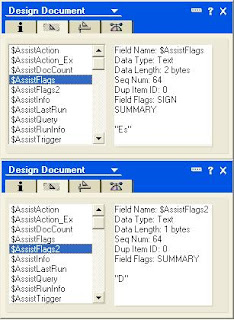
These field settings mean that the agent is disabled for R6 and later, who know to check the $AssistFlags2 field for the real status, but enabled for prior versions that didn't know about the $AssistFlags2 field and ignored it, using the "E" in $AssistFlags.
The problem here is that the BES server acts as if it were an R5 or prior Notes client in this regard. When enabling or disabling the agent, it adds or removes an "E" from the $AssistFlags field, and completely ignores the $AssistFlags2 field.
Assuming the AdminP process has run properly the first time and setup your Editor level OOO agent access, the consequences of this are the following:
1) OOO is currently disabled, the agent icon shows a "check-5", and the fields are set to :
$AssistFlags = Es
$AssistFlags2 = D
2) A user enables the OOO agent from the BlackBerry. The BES server attempts to set the $AssistFlags field to "E", sees that it is already there, and then does nothing. The BES server does not, however, remove the "D" from $AssistFlags2, so we have the same result:
$AssistFlags = Es
$AssistFlags2 = D
The R6 Domino Mail server will use the "D" value and not run the agent, the Lotus Notes R6 client will also see the "D" value and show the agent as disabled, yet the BlackBerry shows that it is enabled. So we have a remote user who thinks the agent is activated, gets back into the office 2 weeks later, and discovers that it never sent a single message out. Bad!
Another issue comes into play as well, in the following sequence of events:
1) OOO is currently disabled, the agent icon shows a "check-5", and the fields are set to :
$AssistFlags = Es
$AssistFlags2 = D
2) OOO is enabled by the Lotus Notes R6 client, which leaves the $AssistFlags field alone but removes the $AssistFlags2 field. This change now shows the agent icon as a "check", and the fields are set to:
$AssistFlags = Es
[$AssistFlags2 field deleted]

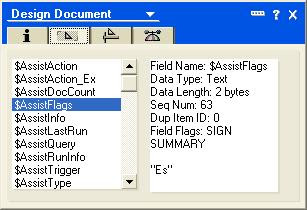
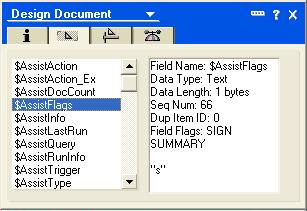
2) A user disables the OOO agent from the BlackBerry. The BES server removes the "E" from the $AssistFlags field, however it does NOT create/populate the $AssistFlags2 field with a "D" to tell R6 clients that the agent is disabled.
$AssistFlags = s
[$AssistFlags2 field still missing]

3) The next time the user enables the OOO agent using the Lotus Notes R6 client, an interesting thing will happen, it will kick off the AdminP process once again to enable the agent for Editor level access. You see the familiar blue text and the enabling of the agent requires a delay to implement.
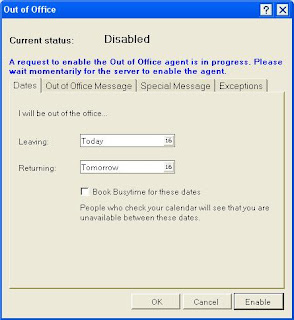 I believe it does this because the BES, when disabling the agent, for some unknown reason also clears the "Run on Behalf of" field, which is needed to allow the agent to run as the user:

In addition to this, when AdminP finally processes the request, grants the access, and enables the agent, the BES server does not pick up this change, for reasons which escape me at this point.
So the result of this sequence is an OOO agent that is enabled on the mail server, shows as enabled on the R6 Notes client, but shows as disabled on the BlackBerry device. This is also bad.
Here is what I believe needs to be done to resolve these issues:
1) Modify the BES server logic such that it acts like an R6 client, that is aware of the $AssistFlags2 field and modifies it instead of (or in addition to) the outdated R5 $AssistFlags field. Of course this might necessitate the minimum Domino mail server level be at R6 or higher, but since we are coming up on R8 and even R6 support is expiring, I don't see this as a huge issue.
2) Ensure the BES server logic does not clear the "Run on Behalf Of" agent field when disabling the OOO agent.
3) Ensure that changes made to the OOO agent by the AdminP process are picked up by the BES server, such that the Domino Mail Server/Notes Client and the BlackBerry device are always in sync as to the status of the OOO agent.
Until these issues are addressed, I see no easy way of programmatically blocking my users from using the OOO functionality on the BlackBerry device, which results in the above issues. My last resort is to send a mass email saying that the BlackBerry OOO feature (which people love) is broken and to always use the Notes client. Unfortunately this will result in higher helpdesk calls, since we always have people leave the office who forget to enable their OOO and end up calling us to enable it for them.
If anyone out there can shed additional light on this issue or possible workarounds, feel free to let me know. I am also actively working on this with RIM, and hope to have it recreated in their environment and logged as an SDR so that it may be addressed in a future service pack.
How could this possibly affect the Out of Office agent usage from the BlackBerry you ask? Well let me tell you it took me quite awhile to figure this out. I'll start from the beginning.
The Out of Office agent is an agent that runs in your mailfile, and when enabled responds to people who send you mail while you are out. In versions of Domino prior to R6 "Manager" mailfile access was required in order to enable this agent. A specific field "$AssistFlags" in the agent was set to "E" to signify that the agent was enabled, and the "E" was removed from this field to signify that the agent was disabled.
For Domino R6 and later, however, a mechanism was put into place which allowed an organization to ratchet down user level access to Editor, which tightened up security and also reduced helpdesk calls about users deleting their own mailfiles and other ridiculous things that happen when users have too much power.
However, with Editor access users would no longer be able to enable / disable their out of office agents. A workaround was developed - a complex one which I will try not to go into here in too much detail - which allowed for the AdminP process to assign this access to the user. This involved adding a field called "$AssistFlags2" (creative, no?) to the agent.
The purpose of this flag was to tell R6 clients and above whether the agent was enabled or disabled, regardless of whether the "E" was in the older "$AssistFlags" field. New agent icons were added, so now instead of seeing only a checkmark to signify enabled or a red circle-X to signify disabled, you would now see an additional "check-5" icon.
This "check-5" icon signifies that the agent is enabled for R5 and below, but disabled for R6 and above! Yes I know this is ridiculous but that is how software coding is sometimes.
The fields would be set as follows (you can ignore the small "s" in $AssistFlags, I am not sure what that is for but appears to be unrelated to the agent status):
$AssistFlags = Es
$AssistFlags2 = D


These field settings mean that the agent is disabled for R6 and later, who know to check the $AssistFlags2 field for the real status, but enabled for prior versions that didn't know about the $AssistFlags2 field and ignored it, using the "E" in $AssistFlags.
The problem here is that the BES server acts as if it were an R5 or prior Notes client in this regard. When enabling or disabling the agent, it adds or removes an "E" from the $AssistFlags field, and completely ignores the $AssistFlags2 field.
Assuming the AdminP process has run properly the first time and setup your Editor level OOO agent access, the consequences of this are the following:
1) OOO is currently disabled, the agent icon shows a "check-5", and the fields are set to :
$AssistFlags = Es
$AssistFlags2 = D
2) A user enables the OOO agent from the BlackBerry. The BES server attempts to set the $AssistFlags field to "E", sees that it is already there, and then does nothing. The BES server does not, however, remove the "D" from $AssistFlags2, so we have the same result:
$AssistFlags = Es
$AssistFlags2 = D
The R6 Domino Mail server will use the "D" value and not run the agent, the Lotus Notes R6 client will also see the "D" value and show the agent as disabled, yet the BlackBerry shows that it is enabled. So we have a remote user who thinks the agent is activated, gets back into the office 2 weeks later, and discovers that it never sent a single message out. Bad!
Another issue comes into play as well, in the following sequence of events:
1) OOO is currently disabled, the agent icon shows a "check-5", and the fields are set to :
$AssistFlags = Es
$AssistFlags2 = D
2) OOO is enabled by the Lotus Notes R6 client, which leaves the $AssistFlags field alone but removes the $AssistFlags2 field. This change now shows the agent icon as a "check", and the fields are set to:
$AssistFlags = Es
[$AssistFlags2 field deleted]


2) A user disables the OOO agent from the BlackBerry. The BES server removes the "E" from the $AssistFlags field, however it does NOT create/populate the $AssistFlags2 field with a "D" to tell R6 clients that the agent is disabled.
$AssistFlags = s
[$AssistFlags2 field still missing]


3) The next time the user enables the OOO agent using the Lotus Notes R6 client, an interesting thing will happen, it will kick off the AdminP process once again to enable the agent for Editor level access. You see the familiar blue text and the enabling of the agent requires a delay to implement.
 I believe it does this because the BES, when disabling the agent, for some unknown reason also clears the "Run on Behalf of" field, which is needed to allow the agent to run as the user:
In addition to this, when AdminP finally processes the request, grants the access, and enables the agent, the BES server does not pick up this change, for reasons which escape me at this point.
So the result of this sequence is an OOO agent that is enabled on the mail server, shows as enabled on the R6 Notes client, but shows as disabled on the BlackBerry device. This is also bad.
Here is what I believe needs to be done to resolve these issues:
1) Modify the BES server logic such that it acts like an R6 client, that is aware of the $AssistFlags2 field and modifies it instead of (or in addition to) the outdated R5 $AssistFlags field. Of course this might necessitate the minimum Domino mail server level be at R6 or higher, but since we are coming up on R8 and even R6 support is expiring, I don't see this as a huge issue.
2) Ensure the BES server logic does not clear the "Run on Behalf Of" agent field when disabling the OOO agent.
3) Ensure that changes made to the OOO agent by the AdminP process are picked up by the BES server, such that the Domino Mail Server/Notes Client and the BlackBerry device are always in sync as to the status of the OOO agent.
Until these issues are addressed, I see no easy way of programmatically blocking my users from using the OOO functionality on the BlackBerry device, which results in the above issues. My last resort is to send a mass email saying that the BlackBerry OOO feature (which people love) is broken and to always use the Notes client. Unfortunately this will result in higher helpdesk calls, since we always have people leave the office who forget to enable their OOO and end up calling us to enable it for them.
If anyone out there can shed additional light on this issue or possible workarounds, feel free to let me know. I am also actively working on this with RIM, and hope to have it recreated in their environment and logged as an SDR so that it may be addressed in a future service pack.
GPS Reporting to BES Server in 4.1 SP3 IT Policy
Upon upgrading to 4.1 SP3, I noticed that the IT Policy has a new Policy Group named "Location Based Services". Under this new group are the following options:

Disable BlackBerry Maps: (Default: False, Requires: Device code 4.0.0 and higher)
Enable Enterprise Location Tracking: (Default: False, Requires: Device code 4.2.1 and higher)
Enterprise Location Tracking User Prompt: (Default: "Your Location is now being tracked at the server", Requires: Device code 4.0.0 and higher)
Enterprise Location Tracking Interval: (Default: 15 Minutes, Requires: Device code 4.2.1 and higher)
I was very excited to see these built in options, which allow tracking via GPS without having to purchase a third party solution. I enabled the tracking, leaving the interval set to 15 minutes, but changing the apparently mandatory notification to "Please call (312) XXX-XXXX to return this device." This serves the purpose of providing some sort of notification, but not letting the user know that their device location is being tracked. I named this policy "Device Tracker" so that I can use this to locate stolen devices, it is not used as a general purpose policy.
I then applied this policy to single user who uses a BlackBerry 8800 device at code level 4.2.1. Everything works great... except for the fact that I have no idea where the GPS information is logged to on the BES server. I would suspect the SQL server in a device related table, but cannot find anything.
I have asked RIM and am awaiting a response... I guess they are not sure either where this information is stored. Once this tiny issue is sorted out I am going to have some fun with Google Maps mashups, making tracking lost or stolen devices that much easier.

Disable BlackBerry Maps: (Default: False, Requires: Device code 4.0.0 and higher)
Enable Enterprise Location Tracking: (Default: False, Requires: Device code 4.2.1 and higher)
Enterprise Location Tracking User Prompt: (Default: "Your Location is now being tracked at the server", Requires: Device code 4.0.0 and higher)
Enterprise Location Tracking Interval: (Default: 15 Minutes, Requires: Device code 4.2.1 and higher)
I was very excited to see these built in options, which allow tracking via GPS without having to purchase a third party solution. I enabled the tracking, leaving the interval set to 15 minutes, but changing the apparently mandatory notification to "Please call (312) XXX-XXXX to return this device." This serves the purpose of providing some sort of notification, but not letting the user know that their device location is being tracked. I named this policy "Device Tracker" so that I can use this to locate stolen devices, it is not used as a general purpose policy.
I then applied this policy to single user who uses a BlackBerry 8800 device at code level 4.2.1. Everything works great... except for the fact that I have no idea where the GPS information is logged to on the BES server. I would suspect the SQL server in a device related table, but cannot find anything.
I have asked RIM and am awaiting a response... I guess they are not sure either where this information is stored. Once this tiny issue is sorted out I am going to have some fun with Google Maps mashups, making tracking lost or stolen devices that much easier.
Friday, May 25, 2007
BES Domino 4.0 / 4.1 Interoperability Issues - Updated 6/1/07
I upgraded one of my main BES servers to 4.1 SP3 HF1 last weekend, but left the other two at 4.0 SP6 HF4. Since the DB Schema was upgraded, we needed to upgrade all of our BB Manager workstations to 4.1 as well.
Now, we are seeing an issue where, using the locally installed 4.1 Manager, we cannot provision a new user added to one of the 4.0 servers using the USB cable. The service books get assigned but the rest of activation / synchronization / prepopulation does not kick off. Wireless activation of new users on the 4.0 servers also seems erratic.
BTW, this upgrade was performed after getting the word at WES that 4.0 and 4.1 servers sharing the same SQL database is OK, since they have many larger accounts than ours and they can't expect them to upgrade 10's of servers at the same time.
Well apparently it is OK for existing users but not newly added users! RIM's tech's response now is: Well it can work but it is not recommended, and the "workaround" is to upgrade the remaining servers to 4.1.
Update 6/1/07: Apparently the tech I spoke with on this issue was incorrect, RIM verifies that they fully support a mixed 4.0/4.1 environment as they told me at WES just a few weeks ago. This issue with USB activation has to do with an identified bug in the 4.1 SP3 BlackBerry Manager console, which is fixed in the upcoming 4.1 SP4, but also can be worked around by downgrading to the 4.1 SP2 Manager console. Thanks to RIM for clarifying this for me.
Now, we are seeing an issue where, using the locally installed 4.1 Manager, we cannot provision a new user added to one of the 4.0 servers using the USB cable. The service books get assigned but the rest of activation / synchronization / prepopulation does not kick off. Wireless activation of new users on the 4.0 servers also seems erratic.
BTW, this upgrade was performed after getting the word at WES that 4.0 and 4.1 servers sharing the same SQL database is OK, since they have many larger accounts than ours and they can't expect them to upgrade 10's of servers at the same time.
Well apparently it is OK for existing users but not newly added users! RIM's tech's response now is: Well it can work but it is not recommended, and the "workaround" is to upgrade the remaining servers to 4.1.
Update 6/1/07: Apparently the tech I spoke with on this issue was incorrect, RIM verifies that they fully support a mixed 4.0/4.1 environment as they told me at WES just a few weeks ago. This issue with USB activation has to do with an identified bug in the 4.1 SP3 BlackBerry Manager console, which is fixed in the upcoming 4.1 SP4, but also can be worked around by downgrading to the 4.1 SP2 Manager console. Thanks to RIM for clarifying this for me.
Subscribe to:
Posts (Atom)